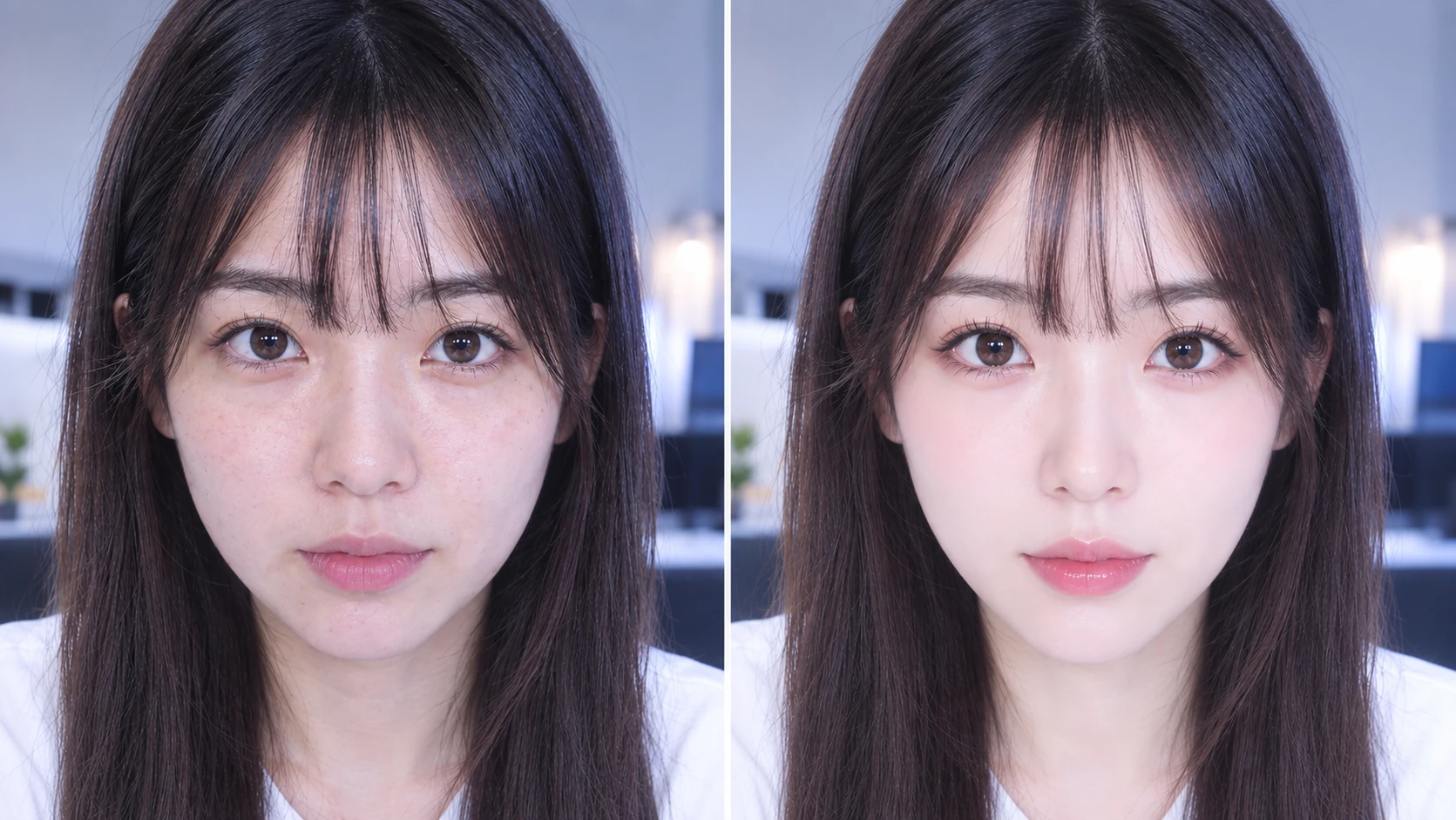
REAL-TIME VIDEO ENHANCEMENT PLUGIN

Mobile-app simplicityEasy, intuitive controlsAll inside OBS Studio

There is no need to launch another app for video enhancement. SkiinOBS is a real-time enhancement plugin installed directly inside OBS Studio.Select multiple cameras from one window, save and restore adjustment presets, and export or import your settings. Multi-person detection supports up to 10 people.

Currently available for Windows only.
プリセット
下のスライダーを動かして、補正機能の操作感をお試しください。
ビューティー
顔補正
体型補正
エフェクト
肌をなめらかに
35
美白
40
明瞭度
20
シミ・ニキビ隠し
45
血色感
30
シャープネス
15
小顔
30
デカ目
25
丸目
15
あご
20
10
鼻を細く
18
口元
12
Vライン
22
ボディライン
30
ウエスト
25
肩幅
10
脚の長さ
28
頭身バランス
18
ヘアカラー
20
フィルター
25
背景ぼかし
15
スタンプ
10
明るさ
20
すっぴん保護
뷰티
얼굴 보정
체형 보정
효과
매끈한 피부
35
미백
40
선명도
20
잡티·여드름 보정
45
혈색
30
샤프니스
15
작은 얼굴
30
큰 눈
25
둥근 눈
15
20
이마
10
콧볼 축소
18
입매
12
V라인
22
바디 라인
30
허리
25
어깨 너비
10
다리 길이
28
신체 비율
18
헤어 컬러
20
필터
25
배경 흐림
15
스탬프
10
밝기
20
민낯 보호
美颜
面部调整
身材调整
特效
磨皮
35
美白
40
清晰度
20
祛斑祛痘
45
红润
30
锐化
15
小脸
30
大眼
25
圆眼
15
下巴
20
额头
10
瘦鼻
18
嘴型
12
V脸
22
身材线条
30
腰围
25
肩宽
10
腿长
28
头身比例
18
发色
20
滤镜
25
背景虚化
15
贴纸
10
亮度
20
素颜保护
Beauty
Face
Body
Effects
Smooth Skin
35
Brighten
40
Clarity
20
Blemish Removal
45
Rosy Tone
30
Sharpness
15
Slim Face
30
Enlarge Eyes
25
Round Eyes
15
Chin
20
Forehead
10
Slim Nose
18
Mouth Shape
12
V-Line
22
Body Line
30
Waist
25
Shoulder Width
10
Leg Length
28
Body Proportion
18
Hair Color
20
Filter
25
Background Blur
15
Stickers
10
Brightness
20
Bare-Face Protection
SIMPLER WORKFLOW

Stay inside OBS Studio From adjustment to broadcast

A simpler, more direct workflow. Complete your stream using OBS Studio alone.

Typical setup

More steps
CameraCamera Utility / Beauty AppVirtual CameraOBSStreaming Destination
Video is routed through external software and a virtual camera before reaching OBS.
VS

Plugin workflow

Simpler
CameraOBSSkiinOBS plugin installedStreaming Destination
Apply the plugin to a camera source in OBS and adjust it in real time.
COMPARISON

Skip another standalone app Extend OBS Studio instead

SkiinOBS is not a standalone app to run beside OBS. It is a plugin installed directly inside OBS Studio.

Comparison SkiinOBS Other products
Adjust directly inside OBS×
Launch an external appNot requiredRequired
Virtual cameraNot requiredRequired for some
PC loadNo separate-app overheadExternal-app overhead added
Multi-person detectionUp to 10 peopleTypically 1 person
Unified multi-camera management
Face and body adjustment
Preset save, restore and transfer

Specifications vary by product, version and system environment. △ indicates partial support or a limited feature range.

CORE FEATURES

Multiple people and cameras managed in one plugin

Handle camera selection, enhancement controls and preset management from one window—without repeatedly adding sources or switching between settings panels.

Manage multiple cameras in one window

Choose the camera you want inside the plugin and adjust each camera without repeatedly adding new sources.

Save, restore, export and import presets

Save favorite settings for quick recovery, export them as backups, or import them to reapply a previous setup.

10

Up to 10 People

Support group talks, collaborations and dance streams with multi-person detection.

Real-Time Beauty

Fine-tune skin, facial contours, eyes and makeup naturally while you stream.

Body Proportion Adjustment

Adjust body lines and leg proportions to suit the framing of your camera.

Adjust while you monitor your stream

No need to switch to another window just to refine your image.

PRICING

Choose the enhancement tools That fit your stream

Reduce the time and cost of skincare and appearance maintenance while keeping your on-camera look polished—a more cost-effective choice for streaming.

BASIC
₩15,000 /month

Recommended for creators who want to start with essential beauty enhancement. Refine skin texture and tone, soften the appearance of dark circles, and create a brighter, polished on-camera look.

Start Free Trial
Recommended
PRO
₩29,800 /month

Recommended for creators who want precise control over facial features, the jawline, and overall body balance. Use the full enhancement toolset to match your streaming style.

Start Free Trial
After the free trial, choose a plan and pay directly inside SkiinOBS. Prices are shown in Korean won (KRW); the final charge may vary by region and the exchange rate at the time of payment.
SYSTEM REQUIREMENTS

Check compatibility Before installation

Review the current platform support and basic requirements at a glance.

Windows 10 / 11

Only the Windows version is currently supported.

Built for OBS Studio

Other streaming applications are not currently supported.

Internet connection required

An internet connection is required for login and user authentication.

Performance varies by setup

System load depends on resolution, frame rate, enabled adjustments, and PC specifications.

Q&A

Frequently Asked Questions

How does SkiinOBS work?

SkiinOBS is a real-time video enhancement plugin installed directly in OBS Studio. You can control its enhancement features inside OBS Studio without launching a separate beauty app or virtual camera.

Which cameras are supported?

In general, SkiinOBS can be used with cameras that OBS Studio recognizes correctly. Compatibility may vary depending on camera specifications, drivers, resolution, connection method, and other factors.

Can I use SkiinOBS with streaming software other than OBS Studio?

No. SkiinOBS is currently provided exclusively as a plugin for OBS Studio and cannot be used with other streaming applications.

Is an internet connection required?

Yes. An internet connection is required to verify login details and user authentication when SkiinOBS starts. Once authentication is complete, you can use the plugin. Video processing is performed locally on your PC.

Can SkiinOBS increase system load while streaming?

SkiinOBS processes video in real time and therefore uses a certain amount of PC resources. Actual system load varies depending on resolution, frame rate, enabled adjustments, OBS Studio settings, and your PC environment.

Can I manage multiple cameras and enhancement presets in one place?

Yes. You can select the camera you want inside the plugin without repeatedly adding sources. Adjustment values can be saved and restored as presets, exported as backups, and imported to reapply a previous setup.

Is SkiinOBS an official OBS Studio plugin?

SkiinOBS is an independent third-party plugin developed for OBS Studio. It is not an official product of, or affiliated with, the OBS Project or Wizards of OBS LLC.

Official Discord

Questions or feedback? Join us on Discord for direct, one-to-one support when needed.

Join Discord